Choose Your Preferred Default Web Browser and Email App in iOS and iPadOS 14
iOS and iPadOS 14 let you replace Safari and Mail as the default browser and email app. Here’s how to switch to Chrome, Firefox, Gmail, Outlook, and more.
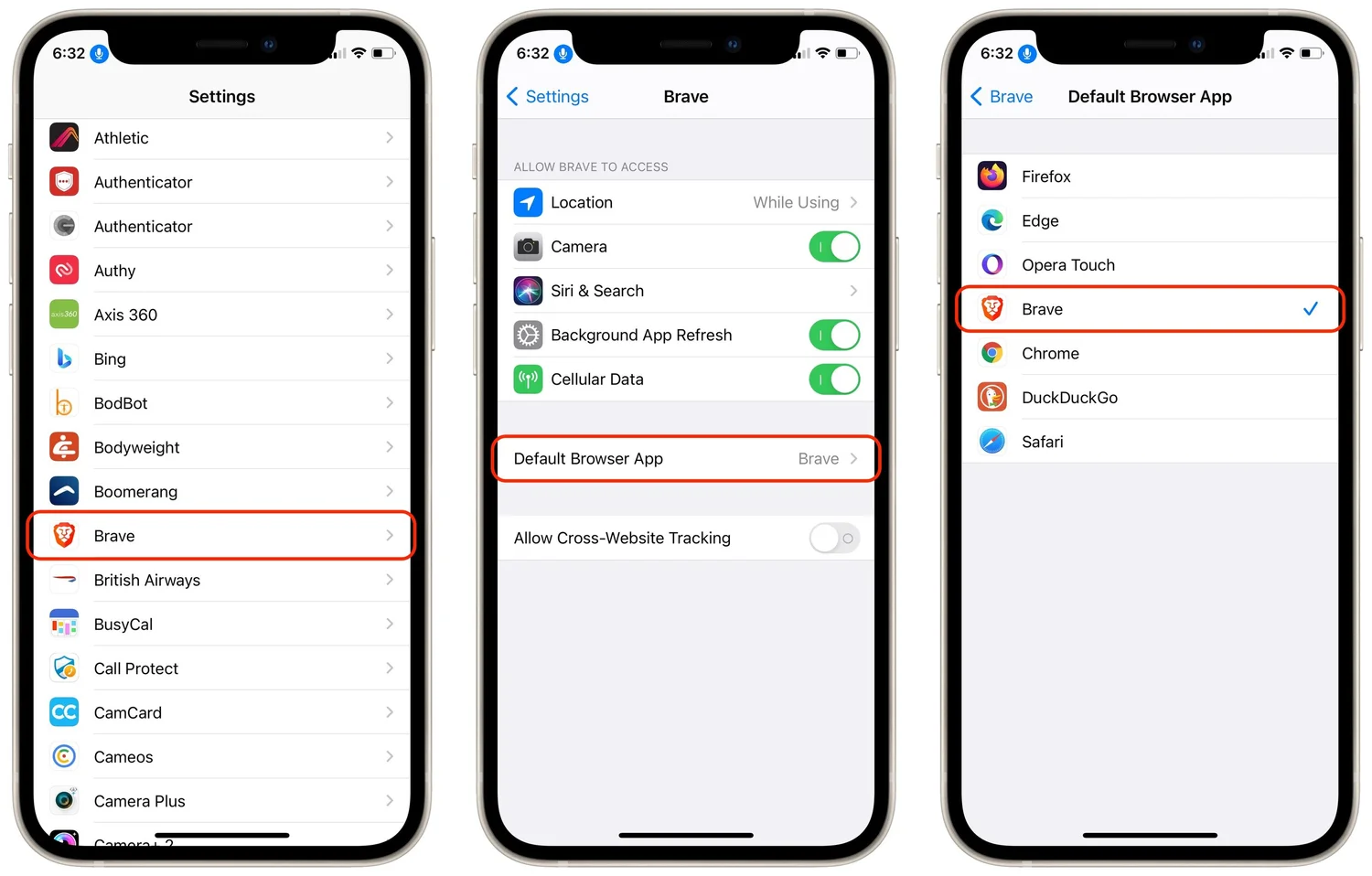
Since the earliest days of the iPhone, Apple’s Safari and Mail have been the default Web and email apps for iOS and, later, iPadOS. There was no way to choose alternatives that would be used whenever an app wanted to open a Web page or create an email message. That has now changed with iOS 14 and iPadOS 14. To switch to a different Web browser (such as Brave, DuckDuckGo Privacy Browser, Firefox, Google Chrome, Microsoft Edge, or Opera Touch) or a different email app (such as Boomerang, Chuck, Hey, Gmail, Outlook, Polymail, or Spark), follow these directions. In Settings, tap the name of the browser or email app you want to set as the default. Then tap Default Browser App or Default Mail App and select the desired app.