Messages Now Offers Shared Conversation Backgrounds
Conversation backgrounds in Messages look cool, and they’re shared with others on iOS 26, iPadOS 26, and macOS 26 Tahoe. Pick an appropriate image and explain what you’ve done to delight your contacts rather than confusing them.

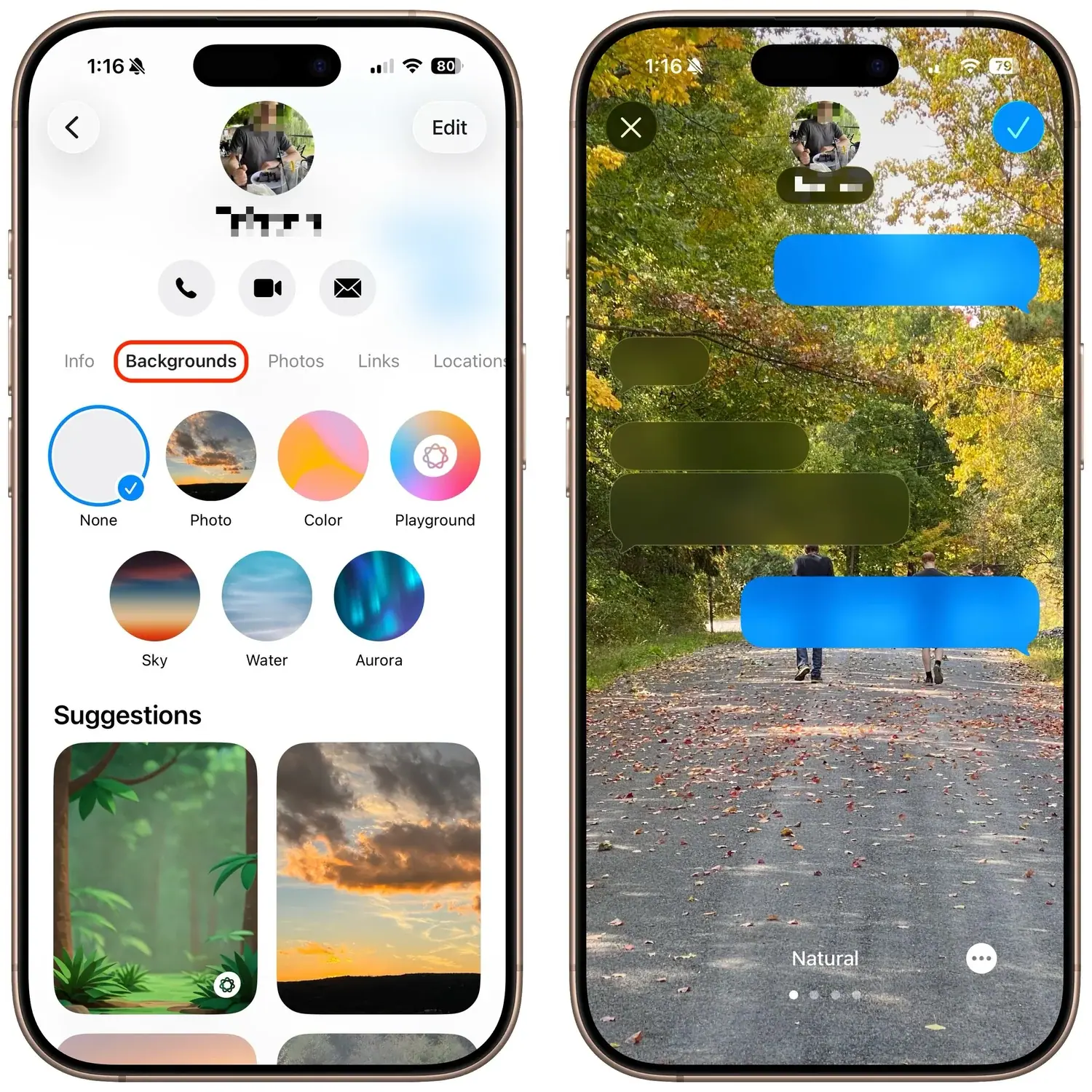
A potentially surprising and fun new feature in Messages in iOS 26, iPadOS 26, and macOS 26 Tahoe is conversation backgrounds. To set one, tap the person or group icon at the top of the conversation, then tap Backgrounds, select an image, and tap the blue checkmark to save. What you might not realize is that conversation backgrounds are shared with others in the conversation who use iOS 26, iPadOS 26, and macOS 26, so be sure to choose appropriate backgrounds. We recommend explaining what you’ve done, as the background can radically change the look of the Messages interface, which some people may find confusing or even upsetting if it happens unexpectedly.