Ever Have Trouble Printing? Try a Different Printer Driver

Some clients have reported problems with HP laser printers failing to print. Sometimes there’s an error. Other times, the print job just disappears into the ether. It’s unclear why this is…
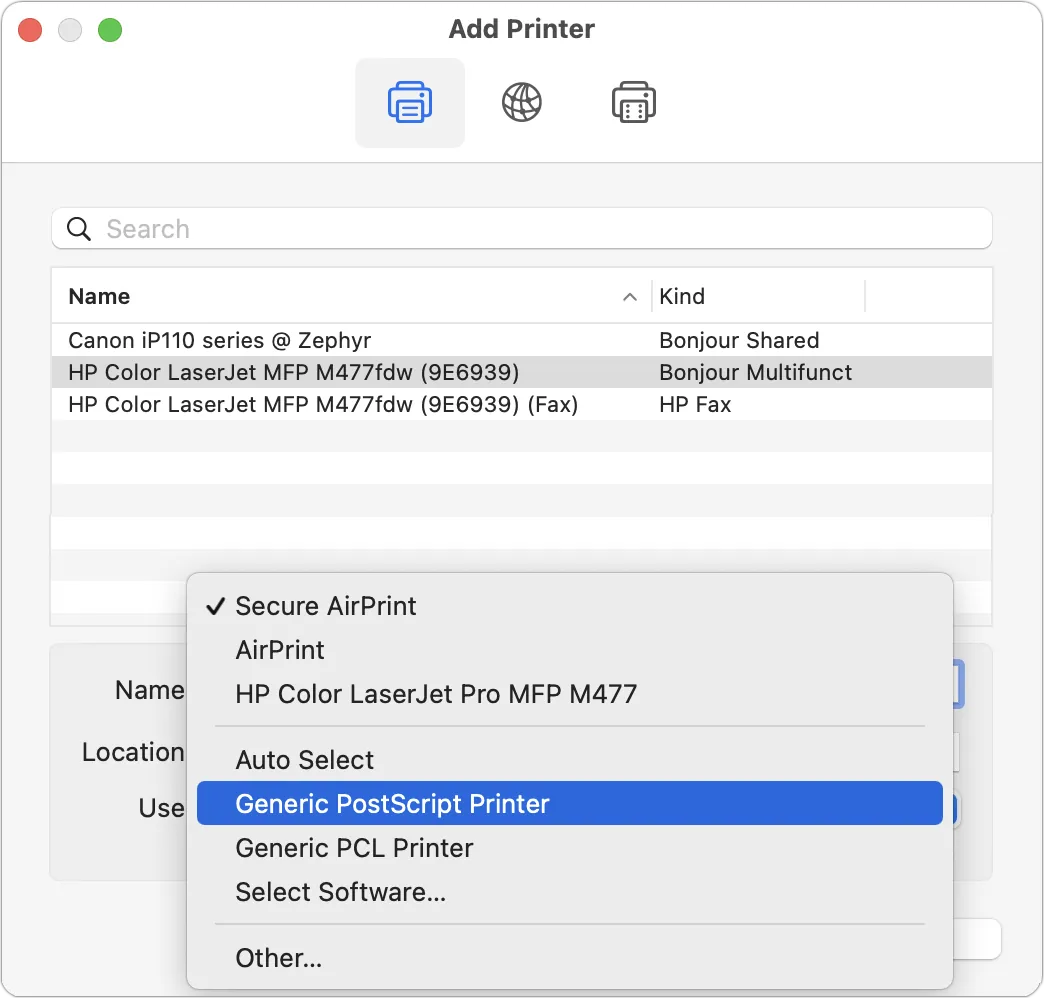
macOS Add Printer dialog with the Use pop-up menu open and Generic PostScript Printer highlighted

Some clients have reported problems with HP laser printers failing to print. Sometimes there’s an error. Other times, the print job just disappears into the ether. It’s unclear why this is happening or how widespread it is, but here’s a workaround that can help. Create a new printer configuration by clicking the + button in System Preferences > Printers & Scanners and selecting your printer in the list. Then, from the Use pop-up menu, choose something other than the default Secure AirPrint driver. We’ve had the most luck with Generic PostScript Printer. Both the old and new configurations will be available when printing, so if one doesn’t work, try again with the other one.

macOS Add Printer dialog with the Use pop-up menu open and Generic PostScript Printer highlighted

About Atlas Solutions

Atlas Solutions is an Apple Technical Partner and Jamf MSP in Davidson, NC. We manage and secure Mac, iPhone, and iPad for businesses in Charlotte, Lake Norman, and beyond. More about us

See all

Mac tips

Dealing With the MacBook Notch in macOS 27 Golden Gate

Menu bar icons hidden behind your MacBook’s notch? macOS 27 Golden Gate finally adds a built-in fix: arrows that reveal the missing items. It’s not a replacement for Bartender or Ice, but it solves the core problem.

1 min read

Mac tips

You Quit the App. Why Is It Still Running?

An app can keep working after you quit it. macOS 27 Golden Gate makes that background activity easier to spot, and gives you controls to stop it when it’s no longer useful.

1 min read

Have an IT question we haven't covered?

In a free 30-minute call, tell us about your devices and your team, and we'll outline the next step.