Dealing With the MacBook Notch in macOS 27 Golden Gate

Menu bar icons hidden behind your MacBook’s notch? macOS 27 Golden Gate finally adds a built-in fix: arrows that reveal the missing items. It’s not a replacement for Bartender or Ice, but it solves the core problem.
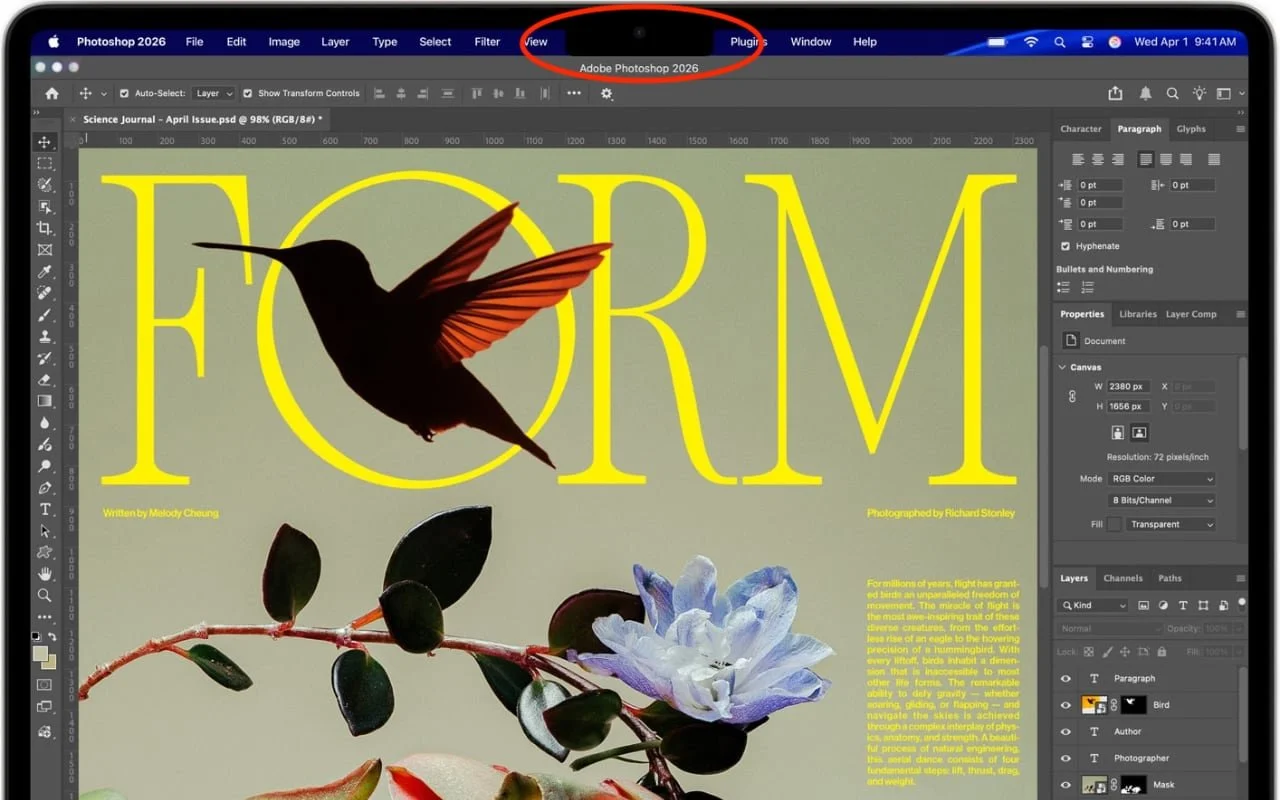
The MacBook Air and MacBook Pro have a notch at the top of the screen that contains the Center Stage camera, camera indicator LED, and True Tone and ambient light sensors. Unfortunately, that notch obscures menu bar icons as they pile up. Utilities such as Bartender and Ice offered solutions, but in macOS 27 Golden Gate, Apple provides a built-in answer. When icons overflow the menu bar, click the left-pointing double arrow《 to the right of the notch (top). The hidden icons appear on the left (bottom), temporarily covering other menu items if necessary.

About Atlas Solutions

Atlas Solutions is an Apple Technical Partner and Jamf MSP in Davidson, NC. We manage and secure Mac, iPhone, and iPad for businesses in Charlotte, Lake Norman, and beyond. More about us

See all

Mac tips

You Quit the App. Why Is It Still Running?

An app can keep working after you quit it. macOS 27 Golden Gate makes that background activity easier to spot, and gives you controls to stop it when it’s no longer useful.

1 min read

Mac tips

Keep a USB Mouse and Keyboard Around for Troubleshooting

For troubleshooting, your wireless Magic Keyboard and Magic Trackpad can work over USB-C if needed, but if Bluetooth or pairing fails when you’re booting into macOS Recovery, an old or cheap wired USB mouse and keyboard can save the day.

1 min read

Mac tips

Find What’s Filling Your Disk with OmniDiskSweeper

Running low on Mac disk space? The free OmniDiskSweeper shows which files and folders are hogging your storage, sorted by size so you can quickly find and trash the biggest culprits.

1 min read

Have an IT question we haven't covered?

In a free 30-minute call, tell us about your devices and your team, and we'll outline the next step.