Here’s How to Stop Getting Paste Permission Requests

In iOS 16, Apple tightened security by displaying a confirmation alert when you copy data from one app and paste it into another. More security isn’t bad, but these alerts can become annoying if…

Person in a dress shirt holding a clipboard showing an iOS paste permission alert, with one hand raised in a stop gesture

In iOS 16, Apple tightened security by displaying a confirmation alert when you copy data from one app and paste it into another. More security isn’t bad, but these alerts can become annoying if you copy and paste frequently. In iOS 16.1, Apple added a setting to control the behavior for each app. If you get these alerts too often when pasting in an app, go to Settings > AppName > Paste from Other Apps and switch it from Ask to Allow. Many apps don’t include the setting; hopefully, any apps where you paste often will have this setting or include it soon.
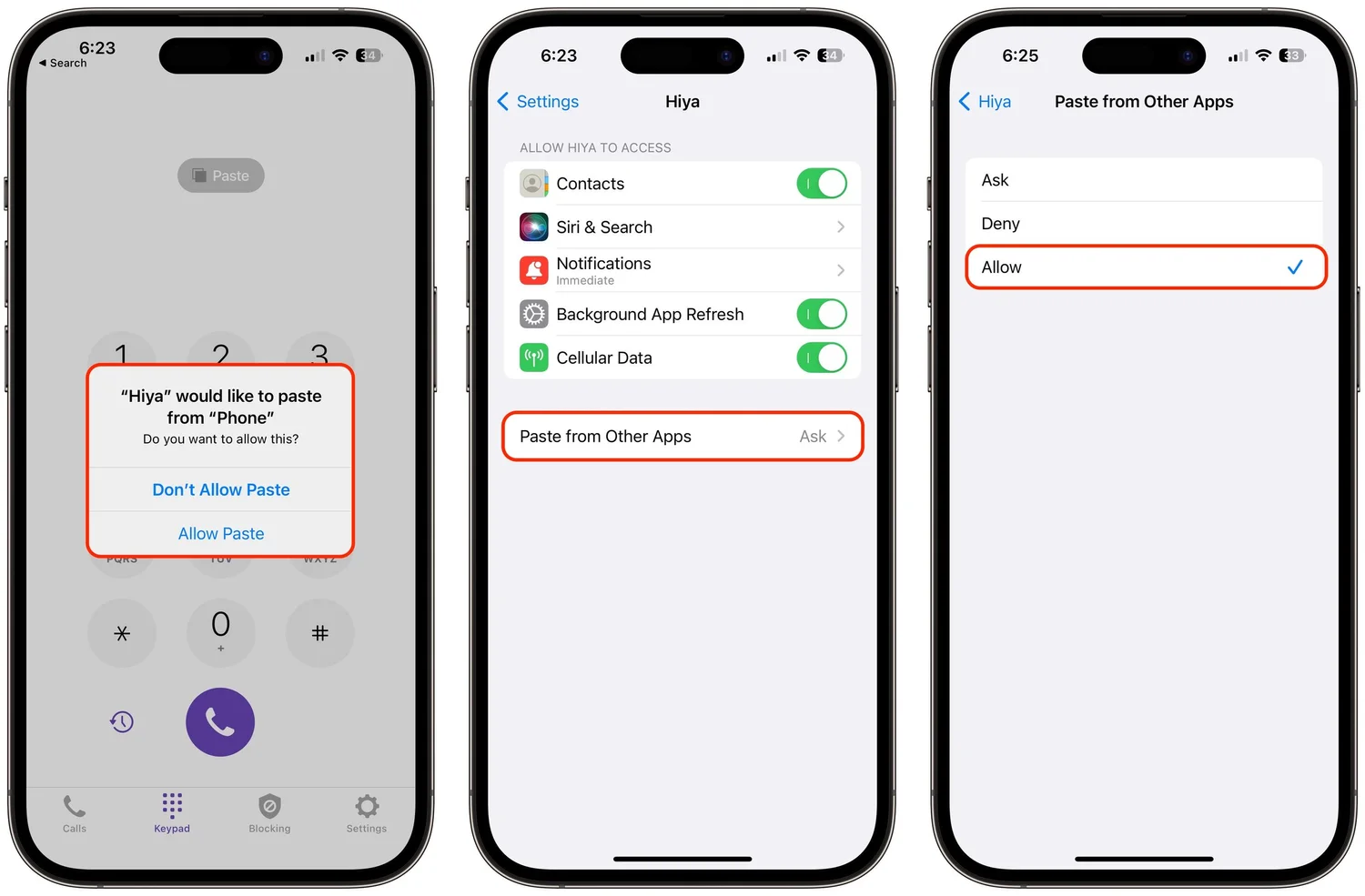
iPhone paste permission alert, Settings Hiya Paste from Other Apps set to Ask, then Paste from Other Apps with Allow

(Featured image based on an original by iStock.com/AaronAmat)

About Atlas Solutions

Atlas Solutions is an Apple Technical Partner and Jamf MSP in Davidson, NC. We manage and secure Mac, iPhone, and iPad for businesses in Charlotte, Lake Norman, and beyond. More about us

See all

Mac tips

Dealing With the MacBook Notch in macOS 27 Golden Gate

Menu bar icons hidden behind your MacBook’s notch? macOS 27 Golden Gate finally adds a built-in fix: arrows that reveal the missing items. It’s not a replacement for Bartender or Ice, but it solves the core problem.

1 min read

Mac tips

You Quit the App. Why Is It Still Running?

An app can keep working after you quit it. macOS 27 Golden Gate makes that background activity easier to spot, and gives you controls to stop it when it’s no longer useful.

1 min read

Have an IT question we haven't covered?

In a free 30-minute call, tell us about your devices and your team, and we'll outline the next step.