Losing the Occasional Important Message? Set up a Ham Filter
Although spam remains as much of a scourge as ever, spam filters have improved enough that most people see relatively little spam and lose relatively few legitimate messages (known as “ham”) to…
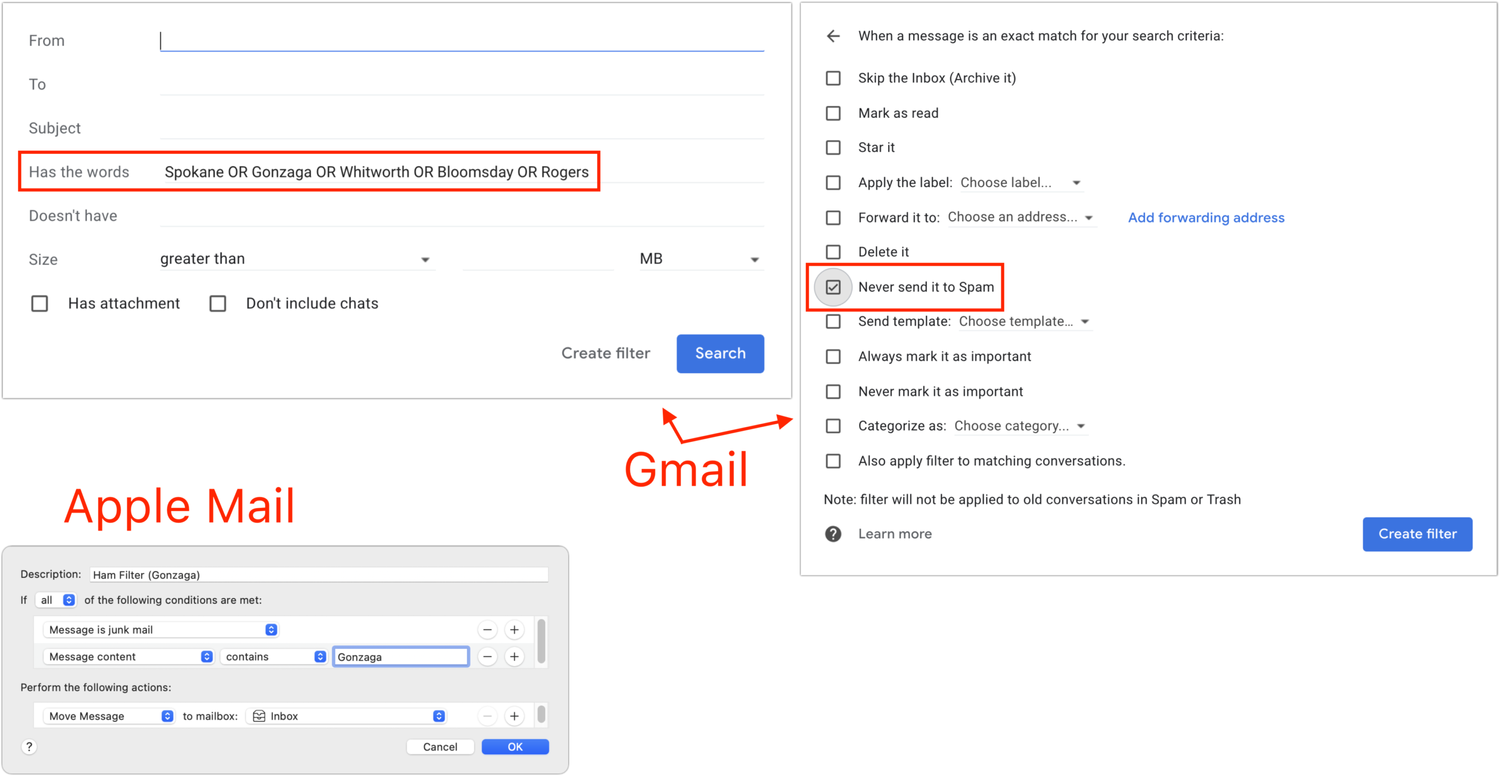
Although spam remains as much of a scourge as ever, spam filters have improved enough that most people see relatively little spam and lose relatively few legitimate messages (known as “ham”) to spam filters. However, good email messages are still sometimes caught by spam filters. To reduce the chance of missing an important message, consider making a “ham filter.” A ham filter looks for certain words—usually proper nouns—that are likely to appear only in legitimate messages and then marks such messages as Not Spam or moves them out of a Spam folder. (This capability is available in Gmail and can be emulated with multiple rules that you create in Apple’s Mail preferences, and likely in other systems as well; ask us about yours if you’re not sure.) Useful ham words include the name of your city, local high school or college names, club names or abbreviations, industry-specific terms, and any other words that are specific to your community or profession. Always test a possible ham word by first searching for it in your Spam folder to make sure it appears only in legitimate messages.