Try macOS 26.2’s Edge Light for Low-Light Video Calls
Dark room, important video call? macOS 26.2’s Edge Light transforms your Mac’s display into an on-screen ring light, illuminating your face so you’re visible on camera.

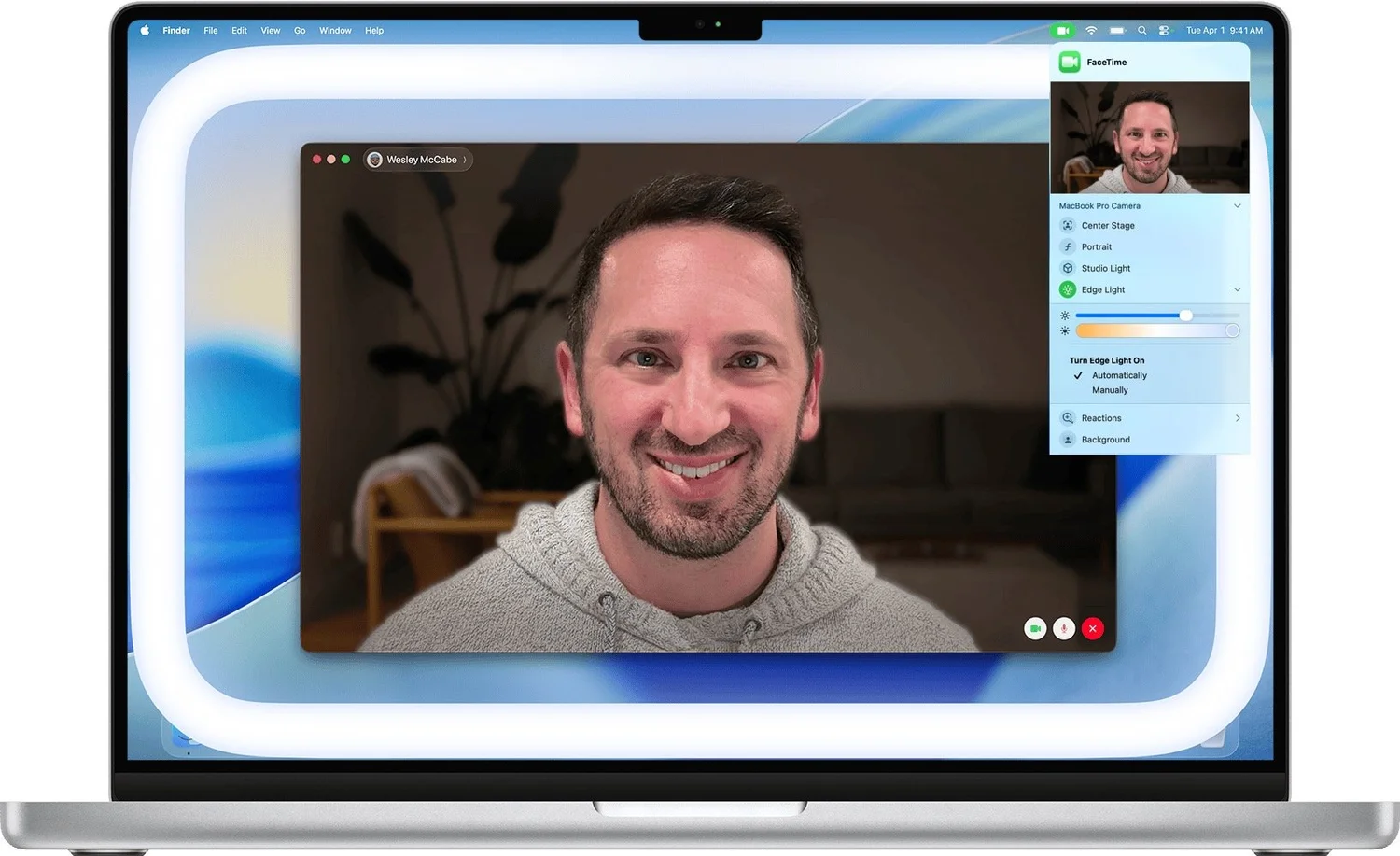
We can’t always guarantee optimal lighting for video calls, especially when using laptops on the go. A new feature in macOS 26.2 Tahoe called Edge Light might help. It’s a video effect that uses the outermost pixels of your Mac’s display to create a bright white rectangle that illuminates your face during video calls. It acts like an on-screen ring light in low-light conditions. You can activate it from the green video camera icon in the menu bar (shown when the camera is active), and on Macs from 2024 and later, you can set it to turn on automatically in low-light environments. Click the disclosure triangle next to Edge Light to adjust the light’s width and color temperature. Mouse awareness allows the light to recede automatically when you move your pointer toward it. While Edge Light won’t replace external lights, it can help make your face visible in otherwise dark rooms.