Create Reminders to Return Calls Directly in the Phone App

Missed a call? Keep follow‑ups from slipping through the cracks by setting a callback reminder right in the Phone app on iOS 26 and iPadOS 26.

Vintage black rotary telephone with its handset off the hook next to a tall stack of pink paper message slips

Apple introduced a neat new feature in the Phone app in iOS 26 and iPadOS 26 (but not macOS 26): callback reminders. Whenever you miss a call and think, “I’d better call this person back later,” you can now create a reminder to do that right within the Phone app. Swipe left on any call, tap the blue clock icon ➊, and select Remind Me in 1 Hour, Tonight, Tomorrow, or Later ➋. The first three options create a reminder in your default Reminders list immediately; Remind Me Later opens the New Reminder editor so you can set a specific time and add details ➌. Tap the blue checkmark button to save your changes ➍.
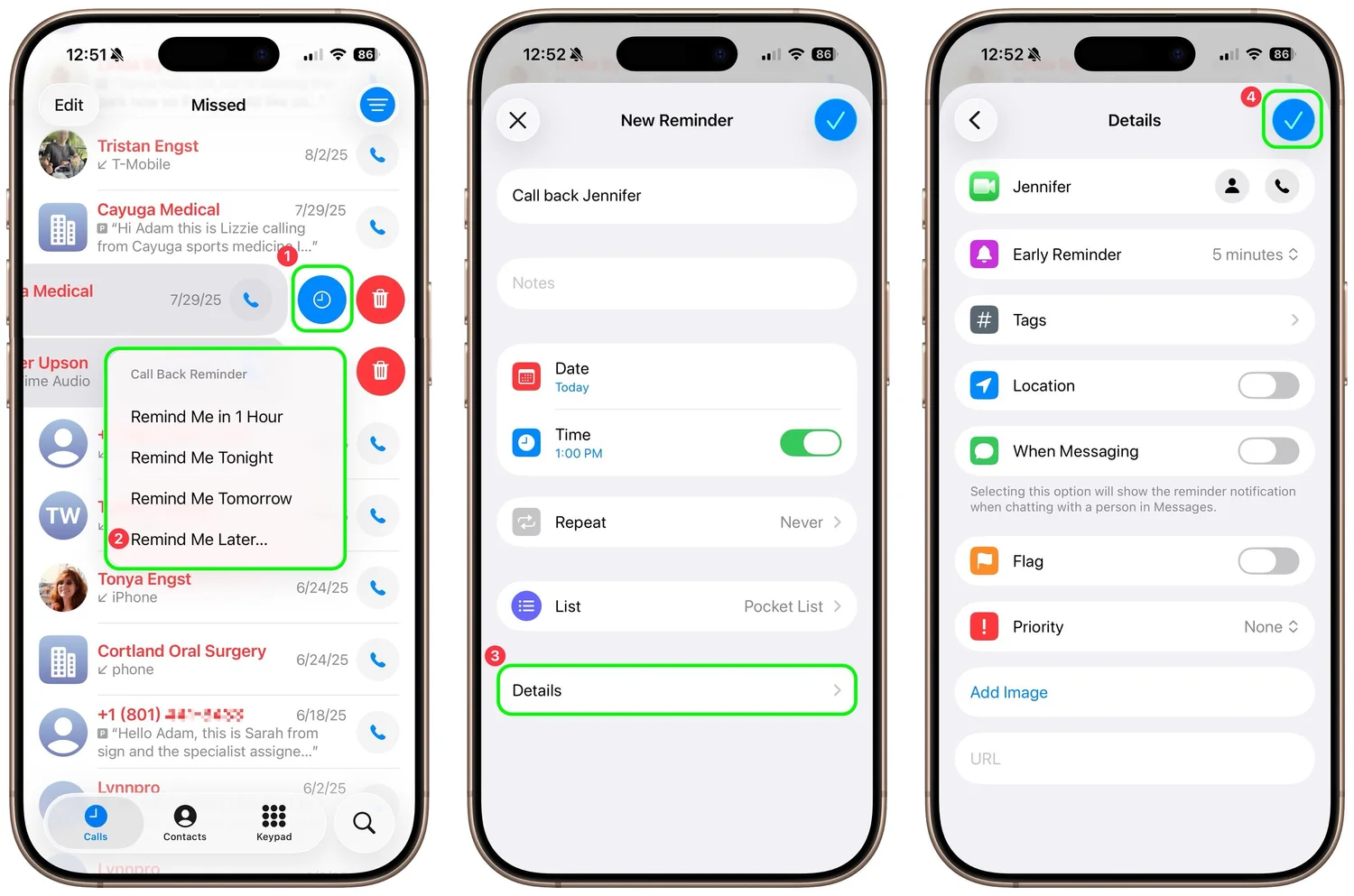

Three iPhones showing steps to set a callback reminder in Phone: swipe to reveal options, choose timing, add details

About Atlas Solutions

Atlas Solutions is an Apple Technical Partner and Jamf MSP in Davidson, NC. We manage and secure Mac, iPhone, and iPad for businesses in Charlotte, Lake Norman, and beyond. More about us

See all

Mac tips

Dealing With the MacBook Notch in macOS 27 Golden Gate

Menu bar icons hidden behind your MacBook’s notch? macOS 27 Golden Gate finally adds a built-in fix: arrows that reveal the missing items. It’s not a replacement for Bartender or Ice, but it solves the core problem.

1 min read

Mac tips

You Quit the App. Why Is It Still Running?

An app can keep working after you quit it. macOS 27 Golden Gate makes that background activity easier to spot, and gives you controls to stop it when it’s no longer useful.

1 min read

Have an IT question we haven't covered?

In a free 30-minute call, tell us about your devices and your team, and we'll outline the next step.