
AI readiness assessment
A 30-minute remote call about the tools you have, the AI your people already use, and where AI can save your team time first.
Or call 704-897-2690

What we look at on the call
We look at your software, the work that takes the most time, the AI tools your people already use, and what you spend on them. It's usually the first step in our AI consulting work.
-
Your tools now
What you run, what people use on their own, including personal accounts they use for work, and what it all costs.
-
Where AI can help first
One workflow, usually something your team repeats every week, like answering the same questions or sorting email. One solid win is worth more than ten pilots.
-
What to fix first
If your files are disorganized or sign-in isn't set up, AI will make things worse. We'll tell you what to fix first, and in what order.
-
The rules
Which tools are approved and what company data can go into them, before anyone starts. AI use policy
What you leave with
A clearer picture: where AI could help your team first, which tools might fit, and what rules to put in place before anyone starts. From there, we can help you roll out a tool or you can keep going on your own.

Questions we get
Do we need a data science team for this?
What happens after the call?
Who should join?
Related services
-

AI tool selection and rollout
We help you choose and roll out Microsoft Copilot, Google Gemini, ChatGPT Enterprise, or the Claude Team plan, starting with a small group. You keep the licenses.
-
AI use policy
Plain-English rules for which tools people can use, what company data can go into them, and when a person reviews the output.
-
AI governance
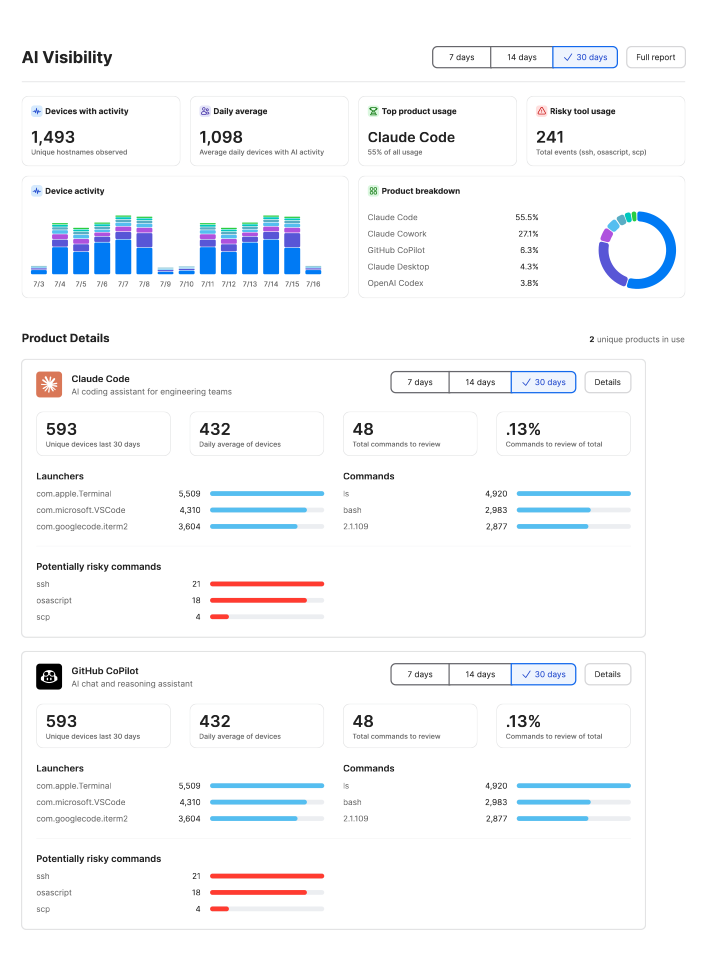
See which AI apps are already in use, set rules your team will follow, and enforce them on your devices and accounts, including Jamf AI Governance on company Macs.
Your team is already using AI. Make it count.
In a free 30-minute call, we'll look at the tools your people already use and the work that slows them down, and show you where AI saves time first.