AI governance for growing businesses
Shadow IT, shadow AI, data leakage, and unmanaged AI spend are already everyday risks. Atlas helps you see what's in use, set clear rules, and enforce them on the devices and accounts you already run, so your team can adopt AI with confidence.
Or call 704-897-2690

When AI is in use before anyone owns the rules
Your team is already pasting customer lists, contracts, and support tickets into personal ChatGPT or Claude accounts. Copilot seats pile up. Coding agents like Claude Code and OpenAI Codex run on developers' Macs, where they can open files and run commands. Hard bans rarely work. What you need are rules people follow, built into your devices and accounts, not a document nobody reads.
What AI governance means here
AI governance is a short set of decisions your team can follow, with controls that back them up. Atlas builds it into your device management, Okta or another identity provider, and Google Workspace or Microsoft 365. It's the governance half of our AI consulting and governance work.
We follow the four steps in the NIST AI Risk Management Framework, a free, voluntary guide from the U.S. National Institute of Standards and Technology: decide who owns AI decisions, find where AI is used, check the risks, and keep managing them as things change.
See what AI is already in use
Shadow IT and shadow AI inventory
We find the apps and AI tools already in use in browsers, chat apps, Mac apps, coding tools, and personal accounts, so your rules start from what people actually do.
AI apps and agents on Mac
On Macs managed with Jamf, AI Visibility in Jamf AI Governance shows which AI apps are active, how many devices use them, and which commands they run. It flags risky commands, such as ssh and osascript, and produces PDF reports we go over with you. The data comes from the Jamf Protect agent, which can run alongside the security software you already use.
Unmanaged AI spend
We check which paid seats are worth what they cost, including Microsoft Copilot, ChatGPT Business, Claude, Cursor, and image tools, remove duplicates, and use each vendor's admin and billing controls.
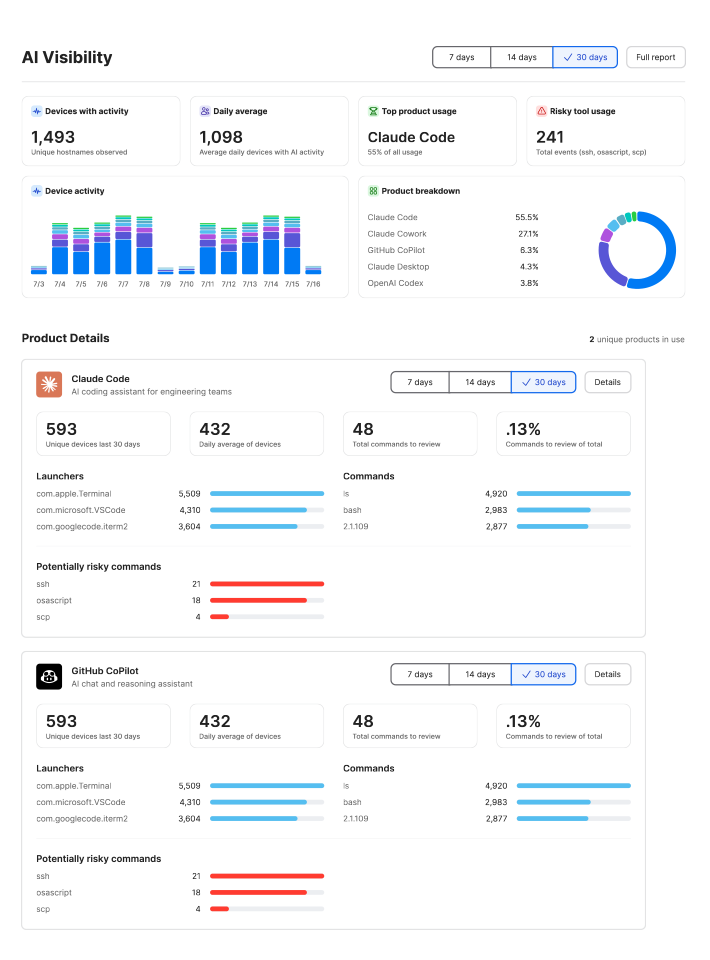
Example of the AI Visibility dashboard in Jamf AI Governance, shown with demo data.
Set rules your team will follow
Clear rules work better than blanket bans. Every tool gets a plain yes or no, and the approved ones are set up correctly from the start.
-
Acceptable use that people follow
Plain-English rules for how your team actually works: which tools are approved, what company data can go into them, and when a person must review AI output before it reaches a customer. AI use policy
-
A sanctioned tool list
We help you choose the work version of each tool: ChatGPT Business or Enterprise, Claude Team or Enterprise, Microsoft Copilot, Google Workspace with Gemini, Cursor, Grok, and Apple Intelligence. Each one signs in through Okta or your identity provider.
-
Local or cloud, under the same rules
When privacy, offline work, or cost call for it, Atlas is piloting local, on-device, and on-prem options alongside sanctioned cloud tools. On managed Apple devices, you choose which Apple Intelligence features are available.
Enforce the rules on your devices and accounts
A policy only works when your systems enforce it. We apply your rules on the devices and accounts your team uses.
-
Tool settings on company Macs
On Macs managed with Jamf, Jamf AI Governance deploys each vendor's own settings through Jamf Pro, including Claude Code, Claude Desktop, and OpenAI Codex. Locked settings stay locked.
-
Work plans, not personal accounts
Customer lists, contracts, and payroll don't belong in free personal AI accounts. Business plans from OpenAI, Anthropic, Microsoft, and Google say they don't train on your work data by default.
-
Sensitive files stay put
We tidy up file sharing before Copilot or Gemini can see it, and use Microsoft Purview sensitivity labels or Google Workspace data loss prevention. AI data protection
-
Unapproved AI sites blocked
Where your tools support it, we block AI sites you haven't approved, so the rules hold on every managed device, not just on paper.
-
Full Disk Access and AI agents
Some AI agents ask for Full Disk Access, which can read files, mail, and messages across the Mac. Apple has said it will make that harder to grant. We allow the apps you trust and deny the rest.
-
Reports you can read
You see which AI tools are in use and which rules are in place. On Macs managed with Jamf, Jamf AI Governance produces audit-ready reports for leadership.
Why teams choose Atlas Solutions
Atlas Solutions is an Apple Technical Partner (#13144) and a Jamf MSP and Reseller, with Jamf Integrator and Jamf Services Partner history and more than 10 years of work with Apple and Jamf. Your AI rules sit on the same systems we already manage for devices and sign-in. We review the policy and its reports with you on a regular schedule, so it keeps up as the tools change.

Questions we get
What does Jamf AI Governance show?
Which AI tools can you lock down?
Does this replace a written AI policy?
Do you ban ChatGPT?
Related services
-

AI use policy
Plain-English rules for which tools people can use, what company data can go into them, and when a person reviews the output.
-

AI access and identity
AI tools and AI agents sign in through Okta or Microsoft Entra, so access follows each person's work account.
-

AI data protection
We keep customer lists, contracts, and other sensitive files out of public AI tools, and we clean up file sharing before Copilot or Gemini can see it.
Ready to set clear AI rules?
Book a 30-minute call. Tell us which AI tools your team uses today and what company data worries you most. We'll outline the first steps.